Saabaai
A refined WooCommerce theme for perfume houses, fragrance boutiques and beauty brands. Thank you for your purchase — this guide takes you from upload to a finished store.
Requirements
| Software | Minimum | Recommended |
|---|---|---|
| WordPress | 6.4 | Latest |
| WooCommerce | 9.0 | Latest (tested up to 11.2) |
| PHP | 7.4 | 8.2 or newer |
| PHP memory limit | 128 MB | 256 MB |
| Max execution time | 60 s | 120 s |
What's in the package
| File | Description |
|---|---|
saabaai.zip | The theme — upload this in WordPress. |
saabaai-child.zip | Optional child theme for your own customisations. |
plugins/saabaai-core.zip | Companion plugin (also bundled inside the theme and installable with one click). |
documentation/ | This guide. |
licensing/ | GPL license and font licenses. |
Installation
- In WordPress go to Appearance → Themes → Add New → Upload Theme, choose
saabaai.zip, click Install Now and then Activate. - You are taken to Appearance → Saabaai setup. Click Install / Activate for WooCommerce and Saabaai Core.
- Import the demo (next section) or start building with the Customizer.
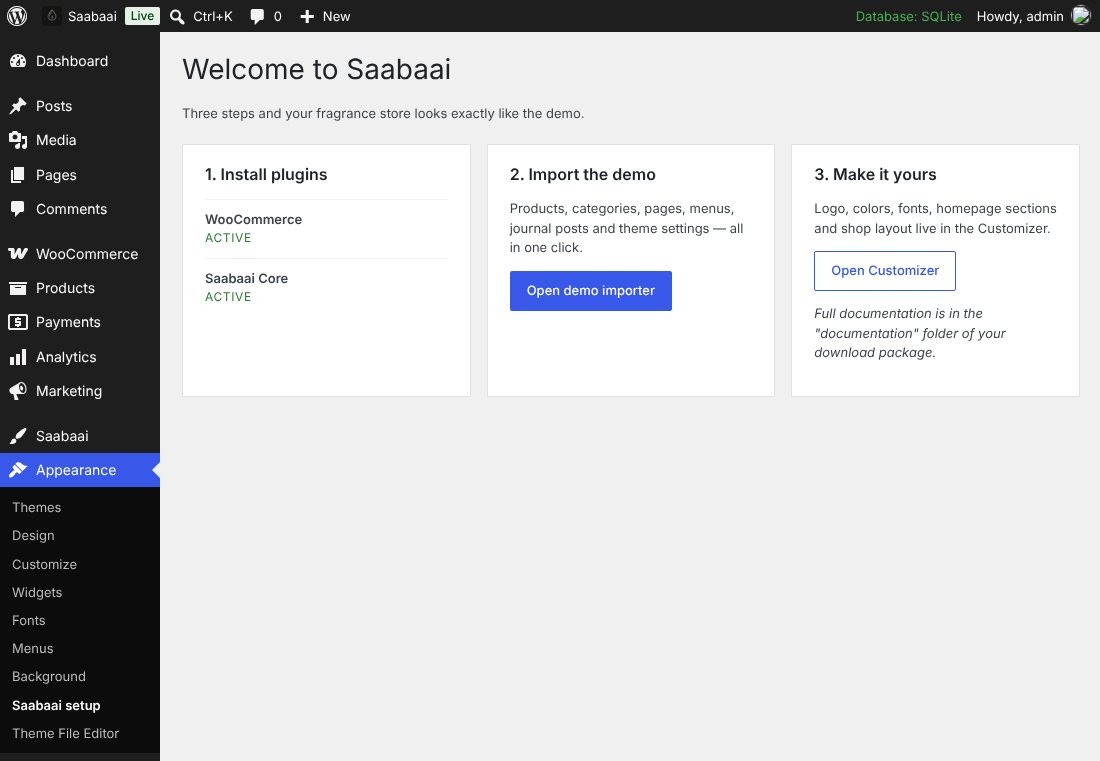
wp-content/themes/ instead, or ask your host to raise upload_max_filesize to 16 MB.Demo import
Go to Saabaai → Demo import and click Import demo content. The importer runs in small steps (so it works on modest hosting) and adds:
- 13 fragrances (simple and variable products with sizes), categories with images, attributes, SKUs and reviews
- Fragrance notes, longevity and sillage for every product
- Home, Our House, Contact, FAQ, Shipping & returns, Terms, Journal and Wishlist pages
- Four journal posts, four testimonials
- Menus, shop filter widgets and every homepage setting
It also sets the cart and checkout pages to the classic WooCommerce layout so every detail follows the theme design, turns off WooCommerce's “coming soon” mode and enables “Cash on delivery” so you can test checkout.

The demo store is set up for Nepal: prices in Nepalese rupees (shown as Rs., no decimals), store address in Kathmandu and selling to Nepal. Change any of this in WooCommerce → Settings → General (store address, selling locations, currency). To prefer the ₨ sign over Rs., add add_filter( 'saabaai_core_npr_symbol', '__return_false' ); to your child theme.
Changed your mind? Remove demo content deletes everything the importer created.
Customizer options
Open Appearance → Customize. All options preview live.
| Panel / section | What you can change |
|---|---|
| Site identity | Logo (recommended 420 × 96 px, transparent PNG or SVG via a plugin), site title, icon. |
| Colors | One-click presets — Pure (clean white, default), Ivory (warm cream) and Noir (dark luxury) — then fine-tune accent, text, page background, cards & panels, dark sections & footer and sale badge. Any dark page background switches the theme to its dark mode automatically. |
| Theme options → Typography | Heading and body fonts (bundled locally — no Google requests), base size, uppercase headings. |
| Theme options → Layout | Container width, corner radius for buttons, inputs and cards. |
| Theme options → Header | Centered or left logo, sticky header, transparent header on the homepage, search/account/wishlist icons, announcement bar text, link and dismiss button. |
| Theme options → Shop & product | Products per row and per page, filter drawer or left sidebar, shop header image, hover image, key notes on cards, free-shipping threshold, size swatches, sticky add-to-cart, reassurance list, related products count. |
| Theme options → Blog | Grid or list archive, sidebar on single posts. |
| Theme options → Footer & social | About text, copyright ({year} placeholder), payment badges, social links. |
| Homepage | Every homepage section — see below. |
Homepage sections
The homepage appears when Settings → Reading uses “A static page” as the homepage. Sections, in order:
| Section | Notes |
|---|---|
| Hero slider | Up to 3 slides with image (2000 × 1100 px, keep the left side calm for text), label, title, text, button and text colour (dark text for light images, light text for dark images). Autoplay seconds and height. |
| Service highlights | Four short promises. They are reused on product pages under the add-to-cart button. |
| Scent families | Product categories with their images (set images in Products → Categories). Leave the ID field empty to show the first five. |
| Product tabs | Bestsellers, New arrivals, On sale. |
| Product spotlight | One product with its notes pyramid. Defaults to the first featured product. |
| Brand story | Image, text, three figures and a link. |
| Promo banner | Background image, text, button and optional countdown end date. |
| Page content | Anything you add to the Home page in the block editor appears here. |
| Testimonials | Entries from Saabaai → Testimonials. |
| Journal | Latest three posts. |
| Newsletter | See Newsletter. |
Developers can reorder sections with the saabaai_home_sections filter.
Menus & mega menu
Menu locations: Primary, Secondary (right of the logo), Mobile (falls back to Primary), Footer column 1–3 and Footer bottom links. The footer column headings use the menu names.
Creating a mega menu
- In Appearance → Menus open Screen Options and tick CSS Classes.
- Add the class
mega-menuto a top-level item. - Its second-level items become column headings and third-level items the links in each column.
Shop & filters
Add filters to the Shop filters widget area (Appearance → Widgets): Filter Products by Price, Filter Products by Attribute, Product Categories and Active Product Filters work best. Choose whether they appear in a slide-out drawer or a left sidebar in Customize → Theme options → Shop & product.
The shop header uses the Shop page excerpt as its description (enable “Excerpt” in the editor's options), category headers use the category description and image.
The free-shipping progress bar in the bag and on the cart page uses the threshold from the Customizer. Set the same amount in your WooCommerce “Free shipping” method.
Products & fragrance notes
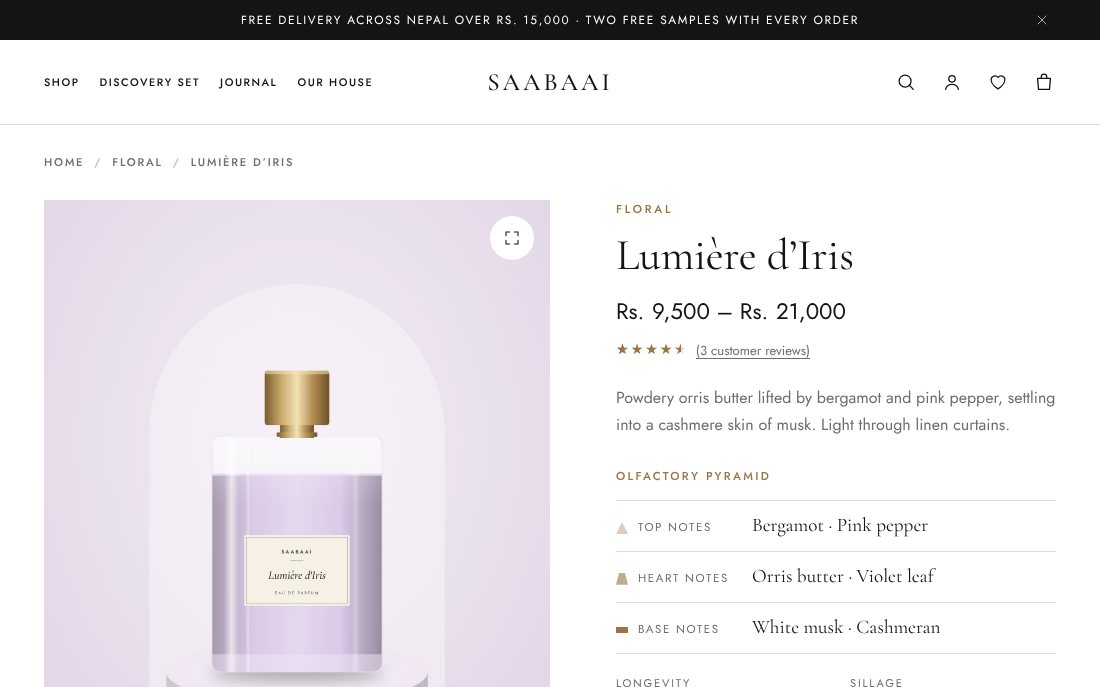
Edit a product and open the Fragrance tab in the Product data box (requires Saabaai Core):
- Top / Heart / Base notes — comma separated, e.g.
Bergamot, Pink pepper. The first note of each tier is shown on product cards. - Longevity and Saabaai — 1 to 5 meters.
- Concentration, Best worn and Seasons — shown as tags.
Use a product attribute such as Size for variations; the theme shows the options as buttons. Use 4:5 portrait images (e.g. 1200 × 1500 px) for the best result, and add a second gallery image for the hover effect.
Wishlist & quick view
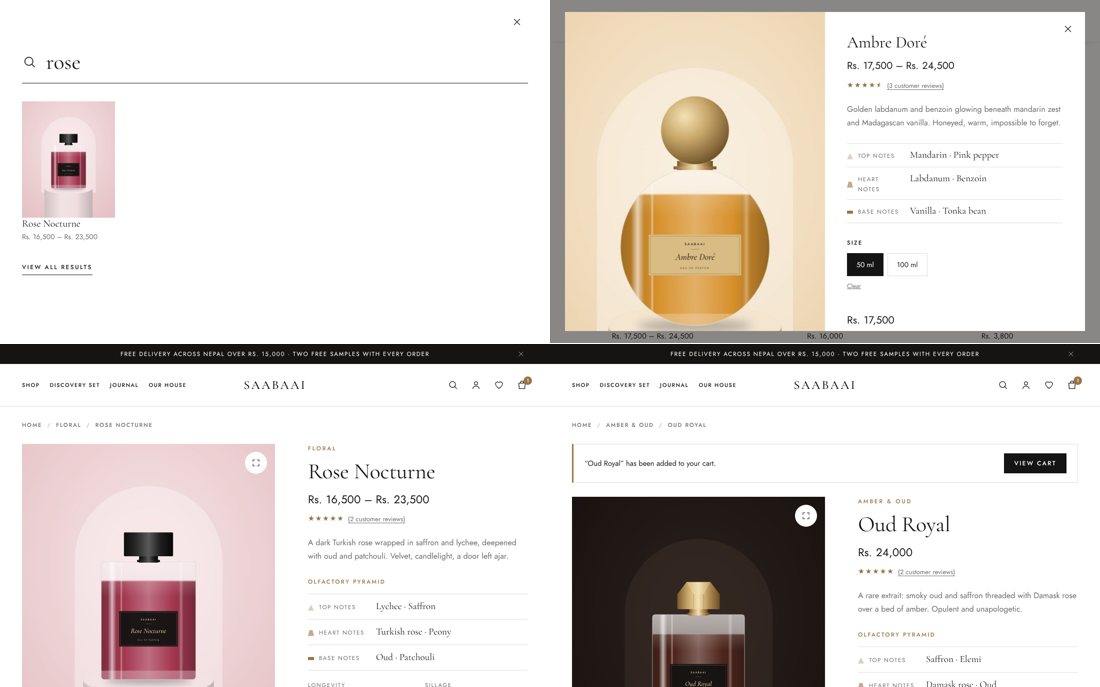
Both are part of Saabaai Core and can be switched off in Saabaai → Settings. The wishlist is stored in the visitor's browser and, for logged-in customers, saved to their account. The wishlist page is created automatically and contains the [saabaai_wishlist] shortcode.
Testimonials
Saabaai → Testimonials → Add testimonial: the title is the customer name, the content is the quote; set the rating and a caption (e.g. the fragrance) in the sidebar. Drag order with the Order field.
Newsletter
In Customize → Homepage → Newsletter paste your provider's form action URL and the email field name (Mailchimp: EMAIL). Without an action URL the form shows a demo thank-you message.
Block patterns & styles
In the block editor open the inserter → Patterns → Saabaai: About, Contact, FAQ accordion and Promo. Block styles: Eyebrow (paragraph), Arch (image) and Display italic (heading). Page templates: Full width and Canvas (no title).
Translation & RTL
Translation templates are in saabaai/languages/saabaai.pot and saabaai-core/languages/saabaai-core.pot. Translate with Loco Translate or Poedit and save the files as saabaai-{locale}.mo in wp-content/languages/themes/. RTL stylesheets load automatically for right-to-left languages.
Child theme
Install and activate saabaai-child.zip if you plan to change code. Add CSS to its style.css and PHP to its functions.php; updates to Saabaai never overwrite them. Customizer settings are stored per theme, so set up the child theme before customising, or use a plugin such as “Customizer Export/Import”.
Developer hooks
| Hook | Type | Purpose |
|---|---|---|
saabaai_home_sections | filter | Array of homepage section slugs and their order. |
saabaai_home_product_tabs | filter | Tabs of the product section (label + shortcode). |
saabaai_defaults | filter | Default values of every theme option. |
saabaai_customizer_schema | filter | Add or change Customizer sections and fields. |
saabaai_dynamic_css | filter | CSS custom properties output. |
saabaai_new_badge_days | filter | Days a product shows the “New” badge (default 14). |
saabaai_free_shipping_threshold | filter | Override the free-shipping amount. |
saabaai_trust_items | filter | Reassurance list on product pages. |
saabaai_payment_badges | filter | Footer payment labels. |
saabaai_open_cart_on_add | filter | Open the bag drawer after AJAX add to cart. |
saabaai_wide_page | filter | Use the wide container on a page. |
saabaai_product_card_actions | action | Icon buttons on product cards. |
saabaai_after_page | action | Markup printed before wp_footer() (drawers, sticky bars). |
// Example: hide the journal section and show 12 products per tab.
add_filter( 'saabaai_home_sections', function ( $sections ) {
	return array_values( array_diff( $sections, array( 'journal' ) ) );
} );
WooCommerce is adapted entirely through hooks — the theme contains no WooCommerce template overrides, so WooCommerce updates never leave outdated templates behind.
Troubleshooting
The homepage shows my latest posts
Set Settings → Reading → Your homepage displays to “A static page” and choose your Home page.
Cart and checkout look different from the demo
New WooCommerce stores use the block-based cart and checkout. To match the demo, edit the Cart page and replace its content with a Shortcode block containing [woocommerce_cart], and the Checkout page with [woocommerce_checkout]. The demo importer does this for you.
Product images are blurry or cropped oddly
Regenerate thumbnails with the “Regenerate Thumbnails” plugin after activating the theme, and use 4:5 portrait images.
The demo import stops
Raise PHP max_execution_time to 120 and memory_limit to 256M, reload the page and click Import again — finished steps are skipped.
Credits & licenses
- Theme and plugin code: GNU GPL v2 or later.
- Cormorant Garamond (The Cormorant Project Authors) and Jost (The Jost Project Authors): SIL Open Font License 1.1.
- Icons, demo product photography and illustrations: original artwork created for Saabaai, GPL v2 or later. You may use them on your own store.